
How to Restore Accidentally Deleted Files in cPanel
However careful you are, mistakes happen. Sometimes surgeons remove the wrong kidney. Sometimes pilots fall asleep while flying a plane. Sometimes those files you thought you could delete... you needed!
One of the first rules in IT is that everything should always be backed up. Luckily for cPanel users, it often is.
If you've accidentally deleted a file or folder on your website and your web host uses cPanel, the chances are you can get it back.
If you're in that unfortunate situation, you've probably checked your local copy of the website, checked your recycle bin, checked the trash folder on the web server, checked your browser cache, checked down the sofa and probably everywhere else you can think of!
But you may not have been aware your site is probably backed up automatically by cPanel, daily, weekly and sometimes monthly too.
So to get back your files:
- Log in to cPanel.
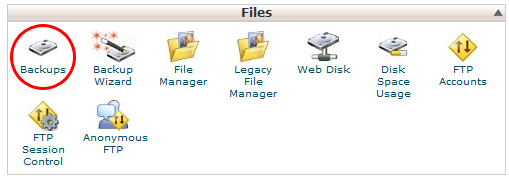
- Find Files > Backups
- Choose the most recent backup where you know your file/folder still existed.
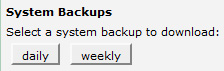
- Save the file, which will be a .tar.gz (don't let the filename put you off, this is just like a .zip file).
- Unzip the file (we like to use www.7-zip.org) and then unzip it again... and hopefully there will be your missing files!
Has this article helped you get back your files? Please let us know by leaving a comment below!
Comments:
I accidentally deleted an expensive premium them I use on my site and by reading this article I was able to restore back the theme.
Thanks
Leave a Reply

Testimonials


